How Smart Template Matching Saves Hours on Your Next Presentation
February 10, 2026
•
DESIGN INSPIRATION
Introduction: How AI Simplifies PowerPoint Design by Automatically Matching Templates
It’s late in the evening. The office is quiet. Your meeting is tomorrow morning.
You open your deck and immediately feel that familiar sense of dread.
The slides come from everywhere. A few from last quarter’s report. A couple borrowed from a teammate. One was pulled from a brand-new PowerPoint presentation template you found at the last minute. Individually, each slide makes sense. Together, they feel like they belong to different companies.
Instead of focusing on your message, you end up fixing formatting issues like mismatched fonts, clashing colors, and poorly placed logos.
Creating a PowerPoint presentation has long involved the accepted burden of slide design. This meant hours dedicated to painstaking manual clean-up, constant adjustments for alignment, and the silent annoyance of feeling your time was poorly utilized.
But the landscape of PowerPoint design is changing.
Smart Template Matching, powered by AI, is quietly removing one of the most time-consuming parts of presentation work and giving professionals something invaluable back: time.
The Invisible Cost of Manual Slide Design
The amount of time presentations truly take up is often underestimated by most people.
Meetings, reviews, pitches, and training sessions; presentations sit at the center of modern work. Studies consistently show that professionals spend a significant portion of their week either creating or consuming slides.
What’s more surprising is where that time goes.
Instead of focusing on strategy or storytelling, a significant amount of time is wasted on tedious tasks: adjusting margins, fixing layouts, changing fonts, and aligning shapes individually.
This is the hidden “formatting tax” of traditional PowerPoint design.
At RocketSlide, we see this constantly. People don’t struggle with ideas. They struggle with making those ideas look consistent across slides pulled from different sources.
Why Manual Formatting Breaks Focus
Manual formatting doesn’t just cost time; it breaks momentum.
Every time you pause your thinking to fix spacing or update a font, you’re switching contexts. That small interruption adds up. Creative flow disappears. Decision-making slows down.
Inconsistency is another problem. Even highly detail-oriented individuals will inevitably overlook details within an extended PowerPoint presentation. Examples of this include a slightly shifted footer, a heading with an incorrect font weight, or a marginally inaccurate color.
And finally, version chaos. Without intelligent template handling, teams end up with multiple versions of the same deck, each “almost final,” each slightly different.
None of this improves communication. It only adds friction.
What Smart Template Matching Actually Does
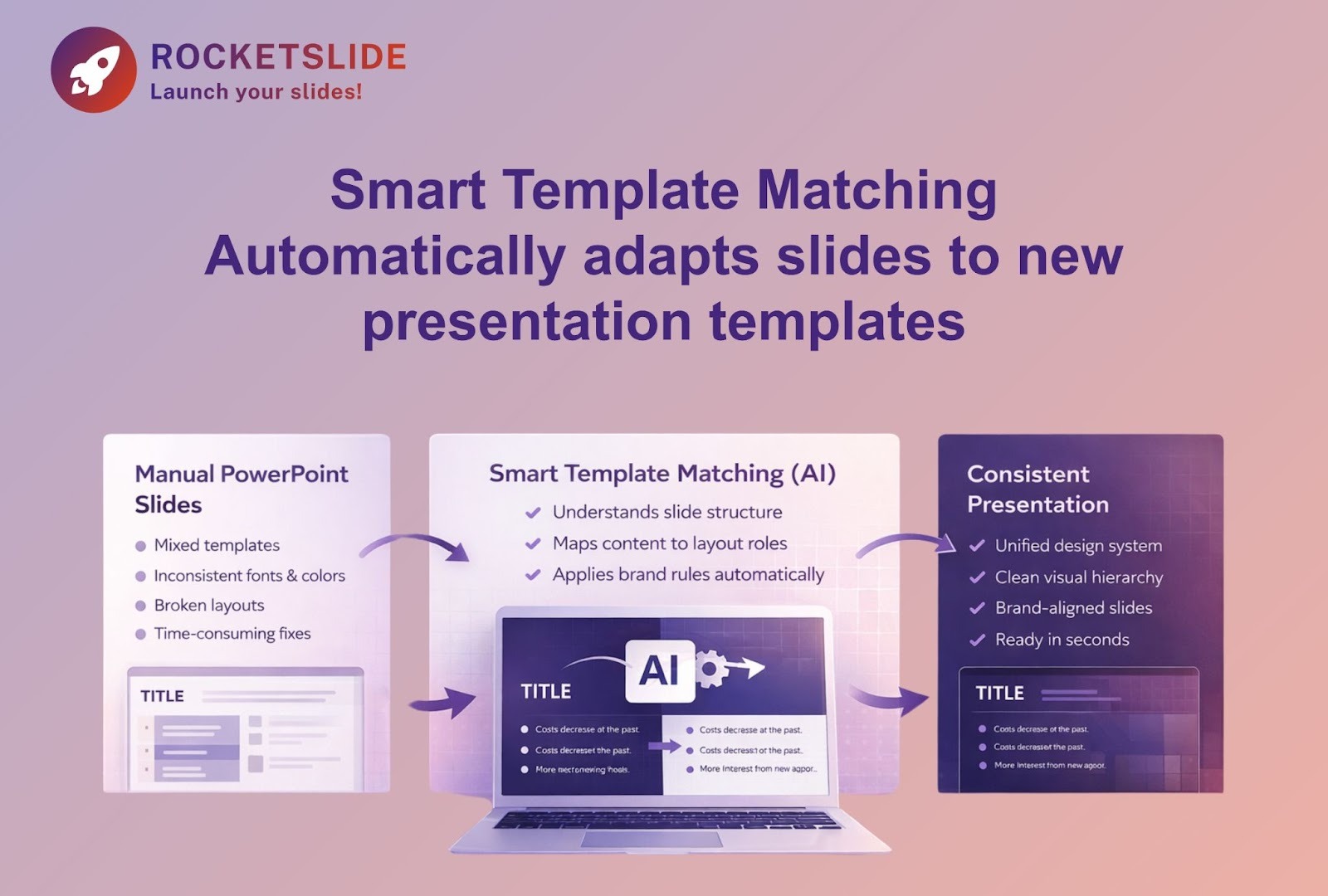
Smart Template Matching is not just automation. It’s understanding.
Traditional tools treat slides as collections of shapes and text boxes. Smart Template Matching treats them as structured content.
Modern AI PowerPoint slides technology analyzes each slide and identifies intent:
- This text is a headline
- This content supports the main point
- This image is explanatory, not decorative
Instead of blindly applying styles, the system maps content to the structure defined in your presentation PowerPoint template.
The result feels almost invisible. You drag a slide from one deck into another, and instead of breaking, it adapts. Colors adjust. Fonts update. Spacing aligns.
That moment, when everything just works, is where hours quietly disappear from your workload.
Why This Matters More Than It Seems
Initially, Smart Template Matching might seem like nothing more than a simple convenience.
In practice, it changes how people approach PowerPoint presentation work altogether.
When formatting stops being a burden, people spend more time on:
- Clarifying the message
- Improving narrative flow
- Anticipating questions
- Refining delivery
This is something we’ve seen repeatedly at RocketSlide. When structure is handled intelligently, people think more clearly about what they want to say, not how to make it fit.
Consistency Builds Credibility
Visual consistency isn’t just about aesthetics.
Studies on brand perception show that consistent design greatly enhances a brand's professionalism. In contrast, minor inconsistencies, like slight font variations or misaligned elements, can quietly undermine credibility.
Smart Template Matching eliminates human error by ensuring every slide, regardless of its source, adheres to the master PowerPoint presentation template.
This capability translates into fewer revisions for teams and gives presenters the confidence that their deck is a strong representation of their brand.
Making Good Design Accessible
Not everyone building slides is a designer, and they shouldn’t have to be.
Sales managers, engineers, analysts, and founders; most people creating PowerPoint presentations care about clarity, not typography. Yet they’re expected to produce decks that look polished and professional.
This is where AI PowerPoint slides technology levels the field.
Presenters can create high-quality slides and focus on content, even without extensive design expertise, thanks to Smart Template Matching. This system automatically manages the layout logic.
That’s not replacing creativity; it’s removing unnecessary barriers.
How Smart Template Matching Works
Under the hood, the process is methodical.
The system begins by analyzing each slide, segmenting it into components like text blocks, images, charts, and shapes. Crucially, however, it doesn't just see these as raw objects but instead identifies their specific roles.
Next, it compares those roles to layouts defined in your PowerPoint presentation template. It looks for the best structural match.
Finally, it applies styling that preserves readability, contrast, and hierarchy across different screens, from laptops to large conference displays.
You don’t need to understand the mechanics to benefit from them. But knowing they exist makes it easier to trust the output.
Getting the Best Results from AI-Assisted Design
Smart Template Matching works best when paired with a strong foundation.
A clean master template matters.
Using placeholders instead of floating text boxes helps.
And a final human review is always essential.
RocketSlide views AI as a collaborative partner, taking on the repetitive, mechanical tasks. This allows people to concentrate their efforts on achieving meaning and creating impact.
Why This Is Really About Time
At its core, this isn’t a story about slides.
It’s a story about time.
Every hour spent fixing formatting is an hour not spent improving the message, rehearsing delivery, or preparing for questions. When people are exhausted by layout work, presentations will suffer, no matter how good the content is.
A strong PowerPoint presentation doesn’t succeed because every element is perfectly aligned. It succeeds because the message is clear and the presenter is confident.
When PowerPoint design stops getting in the way, that confidence shows.
The Future of Presentation Design
Manual formatting won’t disappear overnight, but it’s no longer necessary.
The increasing prevalence of Smart Template Matching is rapidly minimizing the time needed to transform an idea into a refined slide deck. Consequently, the emphasis is shifting from the technical aspects of slide creation to the substance and meaning of the content itself.
That’s the direction RocketSlide is built around:
less friction, clearer structure, and better use of human attention.
The next time you open a deck, you shouldn’t have to fight the layout.
You should be able to focus on what matters most: your message.
And that’s when presentations start doing what they were meant to do.